
3. Working with multiple module instances#
3.1. Required files#
3.2. Introduction#
This tutorial demonstrates SpaceStudio’s ability to allow a system designer to describe communication topologies between multiple modules instances in a C++-idiomatic fashion. Through this tutorial, the attendee will modify a simple application to implement one-to-one, one-to-many, and many-to-one communications with an arbitrary number of module instances.
3.3. Application#
The application used in this tutorial is producer-consumer. It is an application often used for proof-of-concept purposes which is composed of two modules:
producer: Continuously sends data to a consumer viaStreamWrite(). In an industrial-grade application, this would represent a part of the application that generates, transforms or deserializes data, such as a DCT block, or a block that receives data from the network or another data source.consumer: Continuously receives data from the producer viaStreamRead(). In an industrial-grade application, this would represent a part of the application that uses data to perform some computation, an action, or a communication through a peripheral.
As it is given, the base code application is not very flexible: the code of the module producer specifies that the data must be sent to module instance consumer0. This means that the application code would have to be changed if we wished to add multiple instances of consumer or of producer, as all instances of producer would otherwise attempt to write to consumer0.
3.4. Manipulation#
3.4.1. SpaceStudio multi-instance concepts#
To achieve describing generic communications, SpaceStudio automatically defines the following values and macros within the user’s code:
<Module>_GROUP_SIZE: A macro equal to the number of instances of<Module>. For example,PRODUCER_GROUP_SIZEis 2 if there are twoproducerinstances.INDEX: A macro equal to an integer in range[0, <Current module>_GROUP_SIZE - 1].<Module>_GROUP: Aconst unsigned intlookup array of size<Module>_GROUP_SIZEwhich maps anINDEXto a module instance’s ID, sorted by increasingINDEX. For example,PRODUCER_GROUP[0]corresponds to the ID of theproducerinstance whoseINDEXis 0.
Note
The definitions above will be automatically generated in the file platform_definitions.h during the compilation step.
3.4.2. One-to-one communication#
Figure 3.18 shows what is meant in this context by one-to-one communication. Each producer<N> should write to consumer<N>. Conversely, each consumer<N> should read from producer<N>. This is useful in contexts where the system designer wishes to duplicate a pipeline several times.
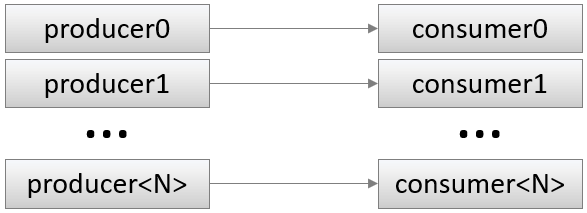
Figure 3.18 One-to-one communication#
3.4.2.1. Create new solution#
In order not to lose the base code, create a new solution called one_to_one based on the given solution single_instance.
3.4.2.2. Implement topology#
All we really need to change are the instance ids that producer writes to, and that consumer reads from. Double-click on producer0 and consumer0 in the Project Explorer to open the source files of modules producer and consumer. Inside the StreamWrite of producer, replace CONSUMER0_ID by CONSUMER_GROUP[INDEX]. Inside the StreamRead of consumer, replace PRODUCER0_ID by PRODUCER_GROUP[INDEX].
3.4.2.3. Assert topological invariants#
In case someone works on our project, it may also be useful (although not mandatory) to make sure that the same number of consumer and producer instances are instantiated. To that end, you may paste the following lines after the #include directives inside the .h files of producer and consumer:
#if PRODUCER_GROUP_SIZE != CONSUMER_GROUP_SIZE
#error "The number of producers is different from the number of consumers."
#endif
3.4.2.4. Separate producer output ranges#
Finally, although not necessary, we could make sure that producer<N> writes data that no other producer writes. This way, we can assert that consumer<N> indeed reads from producer<N>. To this end, in producer.cpp, initialize variable i like so:
unsigned int i = 1000 * INDEX;
Since consumer stops the simulation once any of them reads a specific value, we also must change the value of MAX inside consumer.cpp:
// We stop when we've read the value NUM_VALUES_TO_READ from producer<INDEX>.
const unsigned int MAX = 1000 * INDEX + NUM_VALUES_TO_READ;
Should you wish to make the code more generic, you may replace the constant 1000 with a macro inside application_definitions.h and use it instead of a hardcoded value.
3.4.2.5. Run the code#
Now add as many producer and consumer instances as you wish (the same number of each) within the diagram editor, by dragging and dropping the producer and consumer nodes from the right pane, as shown in Figure 3.19. Then execute the simulation.
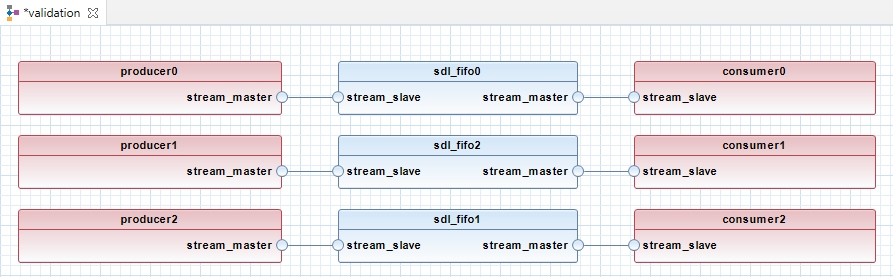
Figure 3.19 Final one-to-one architecture#
Listing 3.2 shows an example of the end of an execution output with three producer and three consumer instances:
...truncated log...
Producer #1 sending 1200
Producer #2 sending 2200
Producer #0 sending 201
Consumer #2 got 2199
Consumer #1 got 1199
Consumer #0 got 199
Producer #2 sending 2201
Producer #1 sending 1201
Producer #0 sending 202
Consumer #1 got 1200

SpaceLib Warning: [consumer2]
This module has requested the END OF THE SIMULATION
Waiting for SystemC to terminate...
Info: /OSCI/SystemC: Simulation stopped by user.

Simulation has ended @2.02e-06 s
Simulation wall clock time: 0 seconds.
3.4.2.6. What just happened ?#
As the values received by the consumer instances show, we have successfully implemented our code in a way that binds producer<N> to consumer<N>.
We could create a new architecture with a more realistic platform (i.e., a Zynq SoC) and assign some of our module instances to hardware, and others to software. We could also go all the way to the physical FPGA board with this code.
3.4.3. One-to-many communication#
The next topology we will implement is shown in Figure 3.20. There will only be one instance of producer, producer0, and it should write some data to all consumer instances. This is useful in contexts where the system designer wishes to split the load of some computation to multiple identical modules. consumer0 and consumer1 might, for example, both run a convolution on different parts of the same image.
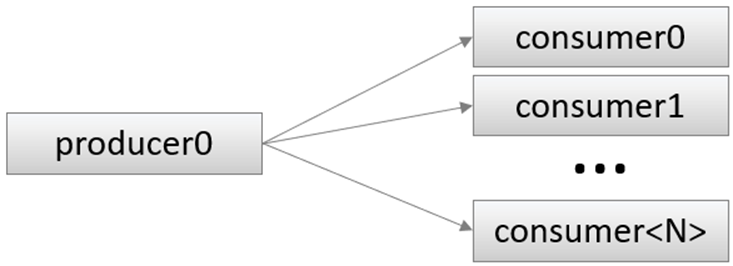
Figure 3.20 One-to-many communication#
3.4.3.1. Create new solution#
Create a new solution called one_to_many based on the initial solution single_instance.
3.4.3.2. Implement topology#
Since consumer already receives its data from producer0, there is nothing we need to change in it. In producer’s code, replace the existing StreamWrite by this code:
for (unsigned int index = 0; index < CONSUMER_GROUP_SIZE; ++index) {
    StreamWrite(CONSUMER_GROUP[index], SPACE_BLOCKING, i);
}
This is a for loop that loops over all consumer indexes, performing a StreamWrite using each one. During code generation, SpaceStudio will statically infer all performed StreamWrite calls to report missing communications and generate hardware FIFO buffers when targeting a physical FPGA board.
3.4.3.3. Assert topological invariants#
As we did earlier, it would be useful to make sure we respect what our code was designed to do by checking whether there is indeed only one producer instance. Add these lines to producer.h after the #include directives:
#if PRODUCER_GROUP_SIZE != 1
#error "This solution only supports one producer"
#endif
Note that we could also do something different if no consumer is instantiated, for example raising a compile-time error similar to the one above, or having producer call sc_stop() immediately to avoid deadlocking. This exercise is left to the attendee.
3.4.3.4. Run the code#
Add several consumer instances to the diagram then execute the simulation.
Listing 3.3 shows an example of the end of an execution output with two consumer instances:
...truncated log...
Producer #0 sending 198
Consumer #0 got 197
Consumer #1 got 197
Producer #0 sending 199
Consumer #0 got 198
Consumer #1 got 198
Producer #0 sending 200
Consumer #0 got 199
Consumer #1 got 199
Producer #0 sending 201
Consumer #0 got 200

SpaceLib Warning: [consumer0]
This module has requested the END OF THE SIMULATION
Waiting for SystemC to terminate...
Info: /OSCI/SystemC: Simulation stopped by user.

Simulation has ended @4.02e-06 s
Simulation wall clock time: 0 seconds.
3.4.3.5. What just happened ?#
As the output in Listing 3.3 shows, we have successfully implemented our code in a way that binds producer0 to all consumer<N>.
3.4.4. Many-to-one communication#
The next topology we will implement is shown in Figure 3.21. There will only be one instance of consumer, consumer0, and it should read its data from each producer. This is useful in contexts where the system designer wishes to merge the outputs of a split computation into a single buffer. The producer instances might, for example, execute a divide-and-conquer algorithm, and consumer0 might implement the final merging step of the algorithm.
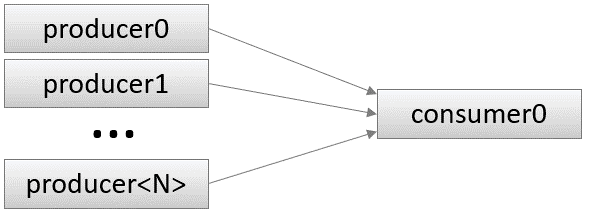
Figure 3.21 Many-to-one communication#
3.4.4.1. Create new solution#
Create a new solution called many_to_one based on the initial solution single_instance.
3.4.4.2. Implement topology#
Since producer already sends its data to consumer0, there is nothing we need to change in it. In consumer’s code, replace the existing StreamRead by this code:
for (unsigned int index = 0; index < PRODUCER_GROUP_SIZE; ++index) {
    StreamRead(PRODUCER_GROUP[index], SPACE_BLOCKING, data);
    SpacePrint("Consumer #%d got %lu from producer #%d\n", INDEX, data, index);
}
This is a for loop that loops over all producer indexes, performing a StreamRead using each one and printing a message specifying which producer the read came from. As earlier for one-to-many, during code generation, SpaceStudio will statically infer all performed StreamRead calls to report missing communications and generate hardware FIFO buffers when targeting a physical FPGA board.
3.4.4.3. Assert topological invariants#
As earlier, it would be useful to make sure we respect what our code was designed to do by checking whether there is indeed only one consumer instance. Add these lines to consumer.h after the #include directives:
#if CONSUMER_GROUP_SIZE != 1
#error "This solution only supports one consumer"
#endif
Note that we could also do something different if no producer is instantiated, for example raising a compile-time error similar to the one above, or having consumer call sc_stop() immediately to avoid deadlocking. This exercise is left to the attendee.
3.4.4.4. Separate producer output ranges#
As in the one-to-one topology, since we here have multiple producer instances, we could make sure that producer<N> writes data that no other producer writes to be sure that consumer0 indeed reads from producer<N> when it is supposed to. To this end, in producer.cpp, initialize variable i like so:
unsigned int i = 1000 * INDEX;
Since consumer stops the simulation once any of them reads a specific value, we also must change the value of MAX inside consumer.cpp:
// Stop when NUM_VALUES_TO_READ read from producer<PRODUCER_GROUP_SIZE-1>
const unsigned int MAX = 1000 * (PRODUCER_GROUP_SIZE - 1) + NUM_VALUES_TO_READ;
Should you wish to make the code more generic, you may replace the constant 1000 with a macro inside application_definitions.h and use it instead of a hardcoded value.
3.4.4.5. Run the code#
Add several producer instances to the diagram then execute the simulation.
Listing 3.4 shows an example of the end of an execution output with four producer instances:
...truncated log...
Producer #2 sending 2263
Consumer #0 got 199 from producer #0
Producer #3 sending 3263
Consumer #0 got 1199 from producer #1
Producer #0 sending 264
Consumer #0 got 2199 from producer #2
Producer #1 sending 1264
Consumer #0 got 3199 from producer #3
Producer #2 sending 2264
Consumer #0 got 200 from producer #0
Producer #3 sending 3264
Consumer #0 got 1200 from producer #1
Producer #0 sending 265
Consumer #0 got 2200 from producer #2
Producer #1 sending 1265
Consumer #0 got 3200 from producer #3

SpaceLib Warning: [consumer0]
This module has requested the END OF THE SIMULATION
Waiting for SystemC to terminate...
Info: /OSCI/SystemC: Simulation stopped by user.

Simulation has ended @8.05e-06 s
Simulation wall clock time: 0 seconds.
3.4.4.6. What just happened ?#
As the output of Listing 3.4 shows, we have successfully implemented our code in a way that binds each producer<N> to consumer0.
3.5. Advanced communication topologies#
Although this tutorial demonstrates simple communication topologies (one-to-one, one-to-many, many-to-one), SpaceStudio’s multi-instance feature will work on any communication topology inasmuch as the communications can be inferred statically. This means that the system designer is free to have their module describe more complex topologies if it suits their applications.
Note
When SpaceStudio is unable to infer the communication target, an error message explains so, as demonstrated below. Notably, this happens when the destination ID is determined based on a method parameter (even if the arguments passed to the method at its various call sites are trivially statically inferrable), because SpaceStudio needs to support the case where module methods are called from outside the module’s translation unit.
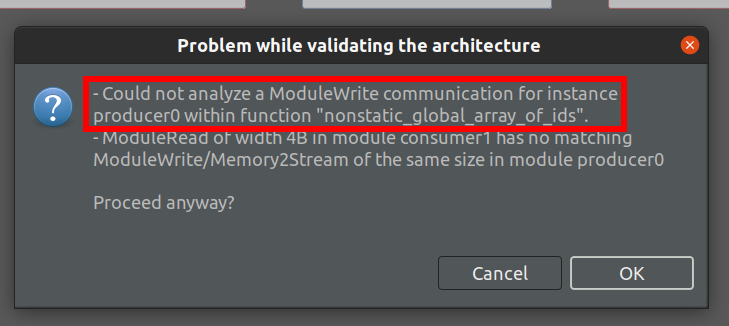
Figure 3.22 Analysis failure message when the communication target cannot be inferred#
3.5.1. Advanced example: Using an array to hold target IDs#
In a scenario where a list of specific instances need to be communicated to (such as when needing to iterate through specific BRAM instances we’ve instantiated), it is possible to create a local constant array of the IDs of these instances, or even a static constant global array of IDs of these instances:
 1// Global static constant array of IDs --can be used to communicate with
 2// specific instances. This code could be placed in application_definitions.h
 3// to be shared by multiple parts of the code.
 4static const unsigned int OUTPUT_BUF_IDS[] = {BRAM0_ID, BRAM4_ID};
 5
 6void my_module::get_inputs() {
 7    // Local constant array of IDs --can also be used to communicate with
 8    // specific instances.
 9    const unsigned int INPUT_IDS[] = {
10        INPUT_MODULE_GROUP[INDEX],
11        INPUT_MODULE_GROUP[INDEX + INPUT_MODULE_GROUP_SIZE / 2]
12    };
13
14    uint32_t data_buf[1024];
15    for (uint8_t i = 0; i < 2; ++i) {
16        // Copies from input_module<INDEX> to BRAM0_ID
17        // and similarly from input_module<INDEX + number of input_module / 2>
18        // to BRAM4_ID.
19        StreamRead(INPUT_IDS[i], SPACE_BLOCKING, data_buf, 1024);
20        DeviceWrite(OUTPUT_BUF_IDS[i], INDEX * 4 * 1024, data_buf, 1024);
21    }
22}