
2. Software acceleration with hardware co-processors#
2.1. Required files#
2.2. Goal#
The aim of this tutorial is to accelerate an application with hardware co-processors using the SpaceStudio development environment. In this tutorial, the user will optimize a single-threaded algorithm with low performance into a multithreaded algorithm with higher performance.
Note
This tutorial assumes you are comfortable with the SpaceStudio GUI, architectures and the monitoring feature covered in Tutorial 1.
2.3. Single thread Application Specification#
The Motion JPEG (MJPEG) is a video format composed of a series of JPEG images. Figure 2.35 outlines the MJPEG decoder application’s task. The MJPEG decoder reads the video stream from the input memory and decodes the images to the video controller memory in RGB format. For simplification, an external subsystem initializes the input video with a MJPEG video. The decoded frames are saved inside the project directory in the decoded_video_frames folder.
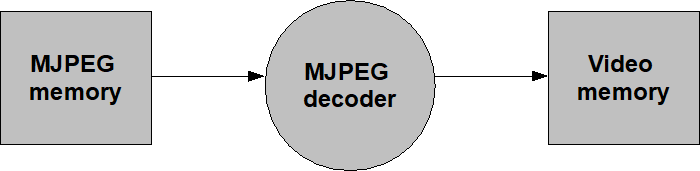
Figure 2.35 MJPEG Application#
The supplied project is named MJPEG and contains a single solution, sequential, made of:
Name |
Kind |
Role |
|---|---|---|
|
Module |
The whole decoder, as one sequential thread |
|
BRAM |
2MB, preloaded with the MJPEG stream from |
|
Device |
Receives the decoded RGBA pixels and writes the frames to disk |
|
Device |
Lets a software module read the SystemC simulated time |
The solution provides two architectures: validation (everything in hardware, used for functional verification) and microblaze (the mjpeg module mapped to software on a MicroBlaze), which is the one we will use to measure performance.
2.4. Profiling the software application#
Application profiling is performed to determine the time consumed per function. SpaceStudio’s monitoring feature (described in Tutorial 1) was used to determine the execution time of the application’s functions. Figure 2.36 and Table 2.3 outline the results of the execution time.
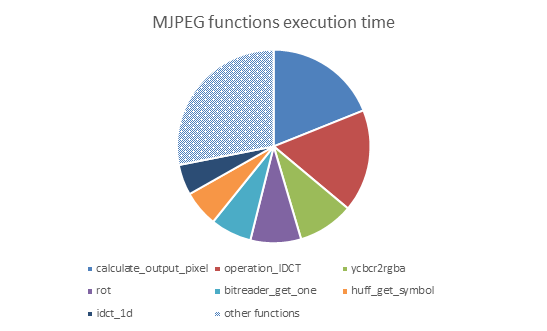
Figure 2.36 MJPEG functions execution time#
Function |
Execution time (%) |
|---|---|
|
18.93% |
|
17.15% |
|
9.35% |
|
8.46% |
|
6.9% |
|
6.01% |
|
5.12% |
Other functions |
28.08% |
Important
These percentages are self (exclusive) times: the time spent in a function’s own instructions, not counting the functions it calls. This matters when you group functions into a co-processor. operation_IDCT calls idct_1d, which calls rot; a co-processor implementing the IDCT therefore absorbs 17.15 + 5.12 + 8.46 = 30.73% of the processor time, not 17.15%. Likewise, calculate_output_pixel calls ycbcr2rgba, so it accounts for 18.93 + 9.35 = 28.28%.
2.5. Single-threaded MJPEG#
As a base reference, we need to determine how the single-threaded algorithm performs on a specific architecture. The supplied project comes with a virtual platform composed of a microblaze executing the MJPEG decoder algorithm as presented by Figure 2.35 . Follow these instructions to determine the decoding performance:
Open the SpaceStudio project by double-clicking
MJPEG.spacestudioOpen the
microblazearchitecture of thesequentialsolutionExecute the simulation (it will take a while)
What is the frames per second ?
While the simulation runs, the mjpeg module reports its progress on the console. It reads the SystemC simulated time through the simulation_timer device and prints an instantaneous frame rate after each frame, plus a running average at regular intervals:
MJPEG - Frame 1 decoded.
...truncated log...
10 frames processed so far. Average fps: 2.608
Note
Do not confuse the simulated time with the Simulation wall clock time, which is how long your workstation took to run the simulation. Only the simulated time is a property of the design.
You can also confirm the decoding is functionally correct by opening the images written in the decoded_video_frames folder of the project directory.
2.6. Choosing what to accelerate#
We would like to parallelize the algorithm to achieve better performance. Based on the results presented by Figure 2.36 and Table 2.3, we propose to accelerate two functions: operation_IDCT and calculate_output_pixel.
Hint
The function operation_IDCT is easier to parallelize, so it is a good place to start even though it is not the one that will pay off the most.
2.7. Multithreaded MJPEG#
Create a new solution (e.g.,
multithread) based on the current one. This will allow keeping the original code intact for further comparisons.Create a new module (e.g.,
idctorcalculate_pixel_output) in the new solution.Add the new module to the
validationarchitecture.Modify the MJPEG and implement the new module (move the function’s body to the module’s thread)
Adapt the communication (inputs and outputs) of the function using the communication API
Compile, run and debug!
Working in the validation architecture first is deliberate: with every module in hardware and no processor in the way, compilation is quicker and a functional bug is much easier to isolate. Only once the decoded frames are correct there should you move on to the microblaze architecture.
2.7.1. Moving a function into a module#
A function call passes its arguments and returns its result implicitly. A module cannot: it is an independent thread, so every argument and every result becomes an explicit message. The usual recipe is:
Define the message types. Group everything the function reads from its arguments into an input structure, and everything it produces into an output structure. Put them in a header under the module’s
importsfolder so that both the caller and the callee can include it. For the IDCT, the input is the 64-coefficient block and the output is the 64 decoded pixels:typedef struct { SPACE_ALIGNED short dataInput[BLOCK_SIZE]; } idct_input_struct;
Tip
Use
SPACE_ALIGNEDon array members that are transferred. Alignment lets SpaceStudio move the payload as whole words instead of byte by byte.Move the body into the module’s thread. The generated thread is an infinite loop; the body of the function goes inside it, between a read of the inputs and a write of the results:
while (1) {
    const bool initializing = spacecomp_thread_loop_start();

    StreamRead(MJPEG0_ID, SPACE_BLOCKING, &input);

    /* ... the body of operation_IDCT, working on "input" ... */

    StreamWrite(MJPEG0_ID, SPACE_BLOCKING, (uint32_t*)Idct, BLOCK_SIZE / 4);
}
Private helpers called by the moved code (
idct_1dandrot, in this case) must move with it and be declared in the new module’s header.Replace the body in mjpeg by the matching communications. The function keeps its name and its call sites; only its implementation changes:
void mjpeg::operation_IDCT(idct_struct data) {
    SPACE_ALIGNED unsigned char Idct[BLOCK_SIZE];

    StreamWrite(IDCT0_ID, SPACE_BLOCKING, &data);
    StreamRead(IDCT0_ID, SPACE_BLOCKING, (uint32_t*)Idct, BLOCK_SIZE / 4);

    operation_LIBU(Idct);
}
Important
Every StreamWrite must be matched by a StreamRead on the other side, in the same order and with the same payload size. A missing or mismatched pair produces a deadlock: the simulation stops advancing while both modules wait on each other. If your simulation hangs without printing anything, this is the first thing to check.
Tip
When a simulation does deadlock, the hardware/software co-debugging technique from Tutorial 1 is the fastest way to find the culprit: put a breakpoint on both sides of the suspect communication and see which one is never reached.
2.7.2. Blocking round-trip versus pipelining#
The IDCT communication above is a blocking round-trip: mjpeg writes the block, then immediately blocks on the read until the co-processor answers. The processor is idle for the whole duration of the hardware computation, so the two never run concurrently.
calculate_output_pixel allows something better. It consumes the luminance and chrominance blocks and writes the resulting pixels straight to the vga_controller — it produces nothing that mjpeg needs afterwards. So the module can be given everything it needs in a single message and left to work on its own:
void mjpeg::calculate_output_pixel(bool grayScale) {
    SPACE_ALIGNED calculate_input_struct calculate_input;

    /* ... fill calculate_input with the geometry, Y, Cb and Cr blocks ... */

    // Send struct — no read back, so mjpeg keeps decoding the next
    // macroblock while calculate_pixel_output writes out this one.
    StreamWrite(CALCULATE_PIXEL_OUTPUT0_ID, SPACE_BLOCKING, &calculate_input);
}
There is no StreamRead at the end. The two threads now form a pipeline, and the processor no longer performs the per-pixel DeviceWrite to the vga_controller either — that bus traffic moves to the co-processor along with the computation.
2.8. Modelling the co-processor’s execution time#
A module mapped to hardware has no instructions to execute and, unless you tell SpaceStudio otherwise, its computation takes no simulated time at all. The measured speedup would then be meaningless — it would model an infinitely fast co-processor.
Use hw_compute_latency(cycles) to add a temporal annotation representing the number of cycles the real IP would take. Place one call per invocation, just before writing the result:
// From HLS - NO optimization
hw_compute_latency(680);
StreamWrite(MJPEG0_ID, SPACE_BLOCKING, (uint32_t*)Idct, BLOCK_SIZE / 4);
The reference solution uses 680 cycles for idct and 10511 cycles for calculate_pixel_output.
Where do such numbers come from? There are two practical answers:
The hardware design team already knows the latency of the IP they will deliver.
An HLS tool reports the latency of the IP it generates from the very same C++ code. Even with no optimization pragma at all — as is the case for the two figures above — the reported latency is a useful worst case: any subsequent optimization can only improve on it.
Note
hw_compute_latency() is ignored for software-mapped modules, so the same source file stays valid under both mappings. It is described in the SpaceLib API reference. HLS-driven refinement of these latencies is the subject of Tutorial 8.
2.9. Measuring the speedup#
Now that you have done a functional verification in validation architecture, modify the microblaze architecture in the new solution and compare the simulation time.
Add the new modules to the diagram, but leave them in hardware — do not drag them into the microblaze_soc block. Only mjpeg stays mapped to software; the new modules are the hardware co-processors.
Measure one change at a time, so that each gain can be attributed to the right cause:
mjpegalone in software (the baseline you recorded earlier);with
idctonly as a co-processor;with
calculate_pixel_outputonly as a co-processor;with both.
Table 2.4 gives the figures obtained on the platform used to prepare this tutorial.
Configuration |
Performance (frame/sec) |
Speed-up |
|---|---|---|
base |
2.611 |
– |
|
2.925 |
1.12 |
|
3.550 |
1.36 |
both in hardware |
5.387 |
2.06 |
Note
Your absolute times will differ — they depend on the processor, the bus and the latencies you annotated. The relative behaviour of the four configurations is what this tutorial is about.
2.10. Going further#
What else can be done to accelerate the algorithm even more? Consider the remaining candidates in Table 2.3 —
bitreader_get_oneandhuff_get_symboltogether account for nearly 13%, but they are bit-serial and tightly coupled to the parser state. Are they good candidates?Could the IDCT offload be made worthwhile by sending several blocks per message instead of one, to amortize the communication over more work?
Instantiate several
idctco-processors and distribute the blocks among them, using the module group mechanism presented in Tutorial 3.Re-run the profiling on the accelerated architecture. The bottleneck has moved — where is it now?